



Why Your Business Needs Google My Business?
Having a Google Business Profile is like having a virtual shopfront that people see when they search for your business online. It helps you build trust and credibility with your customers. Optimizing your Google Business Profile helps customers find your business by sharing key details like address, contact info, and reviews.
In today’s digital world, having a strong online presence is essential for business growth. One effective way to achieve this is by creating a Google My Business profile. In this post, we’ll explain how to create your profile and how to keep it updated for the best results.
Exploring Google My Business
Google offers a free marketing tool called Google Business Profile, allowing business owners to manage their online presence on Google Maps and Search.
Setting up a Google Business Profile boosts your visibility by sharing photos and key details like your location, services, and products with Google.
Google Business Profile is accessible to a wide range of businesses, including those without a physical address, such as online retailers.
Creating Your Google My Business Page
Creating a Google My Business page is essential for any business looking to boost online visibility and attract new customers. This free tool from Google allows businesses to manage their appearance on Google Search and Maps. In this blog, we’ll walk you through creating your Google My Business page with easy-to-follow steps and clear headings to guide you along the way.
- Sign in to Google My Business
To start your Google My Business page, sign in to your Google account. If you don’t have one, create it at accounts.google.com. Then, go to google.com/business to access Google My Business.
- Enter Your Business Name
The next step in creating your Google My Business page is to enter your business name. Enter your full and accurate business name, as it will appear on your Google My Business page and in Google Search results.
- Enter Your Business Location
After entering your business name, you will be prompted to enter your business location. This includes your street address, city, state, and zip code. Verify again the accuracy of your company’s location since this will aid prospective clients in locating and visiting your establishment.
- Verify Your Business
After providing your business name and address, Google will ask you to verify your business. You can verify via mail or phone call. Just follow Google’s instructions to complete the process.
- Add Your Business Information
Once your business is verified, you can start adding more details to your Google My Business profile, like your business category, hours, phone number, website, and a short description. Make sure the information is accurate and thorough to help customers easily learn about your business.
- Add Photos and Videos
Using visuals to promote your brand and attract clients is a great idea. Add high-quality photos of your business exterior, interior, products, and services to give customers a glimpse of what you have to offer. Videos can also be added to provide more engaging content for customers.
- Monitor and Manage Your Google My Business Page
After setting up your Google My Business page, remember to check and update it regularly. Respond to reviews, keep your info current, and share updates to stay connected with customers. Managing your page actively boosts your online visibility and draws more customers to your business.
Creating a Google My Business page is essential for online presence and customer attraction. Follow steps to make a professional page with detailed info, media, and active management for maximum impact.
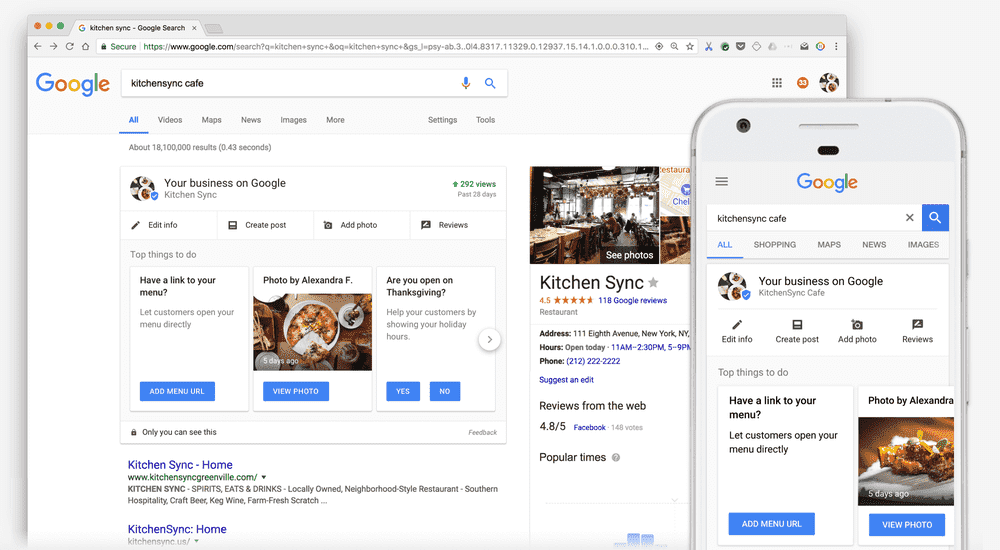
This is how GBP looks like:
Benefits of Google Business Profile
Now that you have successfully created your Google My Business account, let’s explore the benefits it can bring to your business. Having a Google My Business account can boost your local SEO ranking, making it simpler for potential customers to discover your business in Google searches. With this account, you can display essential details like your address, phone number, business hours, and customer reviews, providing customers with the information they need to decide whether to visit your business.
Google My Business offers insights on customer engagement like views, clicks, and requests. Utilize this information to draw clients and enhance your web presence. To encourage consumer interaction, post updates, reply to reviews, and keep your profile up to date.
The most important benefits of having a Google Business Profile include:
- Increased Online Visibility: Your business will be more visible in Google Search and Maps, making it easier for potential customers to find you.
- Customer Engagement: You can interact with customers by responding to reviews, posting updates, and sharing information about your products or services.
- Credibility and confidence: Customers may develop confidence in a well-maintained Google Business Profile by providing accurate information, good ratings, and favorable reviews.
- Local SEO: Having a Google Business Profile can improve your local search engine optimization (SEO) and help your business rank higher in local search results.
- Analytics and Insights: You can track how customers find and interact with your business online through Google My Business insights.
- Free Marketing Tool: Google My Business is a free tool that allows you to promote your business, share updates, and connect with customers without any additional cost.
- Increase Website Traffic: By providing a link to your website on your Google Business Profile, you can drive more traffic to your site.
Overall, having a Google Business Profile offers numerous benefits that can help your business reach a wider audience, engage with customers, and improve its online presence.
Optimizing Your Google Business Profile
However, creating a Google My Business account is just the first step. To ensure maximum visibility and relevance on Google’s search results, it is important to regularly update and optimize your business listing. At any time, you may change the information on your Google Business Profile.
Here are some tips to keep your Google My Business account updated:
- Keep info current: Ensure your business details like name, address, phone number, website, and hours are accurate.
- Share photos and posts: Add quality photos and posts to showcase your business and any promotions or events.
- Respond to reviews: Engage with customers by replying to reviews, showing you value their feedback.
- Use GMB features: Make use of features like messaging, booking appointments, and product listings to enhance customer interaction and decision-making.
Boost Your Reputation with Google Reviews
Google Reviews on Google My Business are crucial for several reasons:
Here are the benefits of positive Google Reviews:
- Build Trust: Good reviews establish credibility and trust with potential customers.
- Boost Visibility: Positive reviews increase visibility in local searches, attracting more customers.
- Improve SEO: Good reviews enhance SEO, helping your business rank higher in search results.
- Engage Customers: Responding to reviews shows you value feedback and engage with your audience.
- Feedback for Improvement: Reviews offer insights to enhance your business based on customer feedback, improving products and services.
Google Reviews on your Google My Business profile are essential for building trust, improving SEO, and engaging with customers. They also provide valuable feedback to help improve your business. By making the most of reviews, you can greatly enhance your online reputation and success in the digital world.
Creating a Google My Business profile is a simple and effective way to increase visibility for your business and attract more customers. Keep your profile updated and engage with customers to maximize your Google My Business benefits and help your business thrive online. Create your Google My Business profile today with Bytelabz and start reaping the rewards of a strong online presence.