Categories
Blog

Free AI Tools for Digital Marketing

AI is transforming everything around us, and many people fear that it might take over their jobs. While it’s true that AI is replacing certain tasks, there’s no need to panic. Instead, we should see this as an opportunity to grow. As digital marketers, it’s essential to adapt and upgrade our skills with AI. In this article, we’ll explore some powerful AI tools that can simplify and enhance various digital marketing tasks.  

What Are AI Marketing Tools?

AI marketing tools are platforms or apps that use artificial intelligence to help automate or improve tasks like content creation, SEO, customer engagement, email marketing, and more. They make it easier for marketers to work faster and smarter.

1. Content Creation Tools

These AI platforms help you craft blog posts, landing pages, emails, and more—fast.
  • ChatGPT – A conversation-powered AI by OpenAI, perfect for generating detailed blog posts, FAQs, email drafts, and product descriptions. Comes with a free tier and grows more powerful with ongoing updates.
  • Jasper AI – Great for long-form content tailored to your brand voice. It offers free trials and is ideal for scalable, high-converting copy.
  • Copy.ai – Focuses on ad copy, emails, and product descriptions with a generous free plan—perfect for quick writing tasks on a budget.
  • Writesonic – Delivers SEO-friendly blog posts and landing page copy. A great all-rounder that includes a free plan.
Tool Name Features Free Plan
ChatGPT Blog posts, FAQs, email content ✅ Yes
Jasper AI Long-form content, brand voice support ✅ Trial
Copy.ai Emails, product descriptions, web copy ✅ Yes
Writesonic Blog articles, landing pages ✅ Yes
   
  1. Social Media Post Creation (Text + Image)

  These tools are ideal for crafting ready-to-publish social media content.
  • Canva Magic Studio – Offers AI-powered tools like Magic Write for captions and Magic Design for creating images and layouts. A user favorite with free access.
  • Predis.ai – Automatically generates caption ideas, hashtags, and image suggestions based on post content. Free starter plan available.
  • Lately.ai – Converts blog posts or video transcripts into bite-sized social posts. Ideal for repurposing long-form content (trial plan available).
  • ContentStudio – Combines caption generation with scheduling and analytics—great for streamlining social posting.
Tool Name Features Free Plan
Canva AI Image design, captions, templates ✅ Yes
Predis.ai Auto-generate posts from URLs or ideas ✅ Yes
Lately.ai Turns blogs or podcasts into social posts ✅ Trial
ContentStudio Post scheduling + AI captions ✅ Trial
 
  1. Video Creation Tools

  Use these to turn text or blogs into engaging videos—no script or filming needed.
  • Pictory – Transforms blog posts or scripts into shareable videos using AI agents. Offers free trial with rich features YouTube.
  • Lumen5 – Lets you drag and drop text into video templates and automatically matches scenes and voiceovers. Includes a free plan.
  • Synthesia – Generates AI voiceovers and avatars. No free plan, but worth it for professional-quality explainer videos.
  • InVideo – Provides extensive templates and supports text-to-video creation. Free plan includes watermark.
Tool Name Features Free Plan
Pictory Turns blog posts into videos ✅ Trial
Lumen5 Drag-and-drop video creation from text ✅ Yes
Synthesia AI avatars for video presentations ❌ No
InVideo Templates + text-to-video support ✅ Yes
  1. Ad Copy & Campaign Tools

  These tools help generate ad text, headlines, and visuals tailored for high conversions.
  • AdCreative.ai – Instantly creates ad banners, videos, and headlines with conversion scoring. Includes a free trial.
  • Copy.ai – Also effective for generating Google or Facebook ad copy quickly via its free plan.
  • Writesonic – Supports paid ad formats with AI-optimized headlines and text.
  • Anyword – Uses data-driven insights to suggest ad copy with predicted performance scores. Offers trial periods.
Tool Name Features Free Plan
AdCreative.ai AI-generated banners, headlines for ads ✅ Trial
Copy.ai Google/Facebook ad text generator ✅ Yes
Writesonic Ad copy for Facebook, Google, LinkedIn ads ✅ Yes
Anyword Predictive copy with scoring for ads ✅ Trial
  1. SEO Tools
  These platforms are indispensable for keyword research and writing well-optimized content.
  • Surfer SEO – Analyzes competitor pages and gives real-time suggestions for headings, word count, and related terms. Some tools are free Surfer SEOBacklinko.
  • NeuronWriter – Uses AI to build content briefs centered on search intent. Generally allows a trial period.
  • Ubersuggest – Offers keyword data, SEO audits, and backlink analysis with a comprehensive free plan.
  • Frase.io – Automates content briefs and structure based on top-ranking content.
Tool Name Features Free Plan
Surfer SEO Content editor, keyword suggestions ✅ Limited
NeuronWriter Intent-based content writing and scoring ✅ Trial
Ubersuggest AI SEO reports, keyword analysis ✅ Yes
Frase.io AI content briefs and SEO optimization ✅ Trial
 

6.Email Marketing & Personalization

  Build smarter email campaigns with these AI-enhanced tools.
  • Mailchimp with AI – Suggests better subject lines, automates campaign flows, and integrates seamlessly with marketing channels.
  • Sender.net – AI-driven content suggestions and automated sequences with a user-friendly free plan.
  • Flowrite – Generates email replies or outreach messages for professionals, via a trial plan.
  • Rasa.io – Automatically curates and sends personalized email newsletters to your audience (free trial available).
Tool Name Features Free Plan
Mailchimp + AI Subject line suggestions, email design ✅ Yes
Sender.net Smart email content + automation ✅ Yes
Flowrite Auto-generate email replies using AI ✅ Trial
Rasa.io Personalized email newsletter generator ✅ Trial
  1. Automation & Workflow Tools

  Streamline processes by integrating AI into your daily operations.
  • Zapier + OpenAI – Lets you automate tasks using AI, like auto-generating social posts or customer replies. Free tier included.
  • Make (Integromat) – Offers visual workflow building with AI modules for data parsing or content generation.
  • HubSpot AI – Includes automated lead scoring, email suggestions, and conversation bots within its CRM.
Tool Name Features Free Plan
Zapier + OpenAI Automate tasks using AI-generated actions ✅ Yes
Make (Integromat) Automate AI-powered flows like email follow-ups ✅ Yes
HubSpot AI AI lead scoring, smart CRM emails ✅ Yes
   

Why AI Marketing Tools Are Perfect for Small Business

  • Save Time: Automate routine work
  • Cost-Effective: Most tools offer free plans
  • Boost Quality: AI improves grammar, design, and targeting
  • Scalability: Great for growing your business without hiring big teams
  Using free AI tools for digital marketing is a smart move — especially for small businesses or agency looking to grow on a budget. From writing and SEO to video and ads, these AI marketing tools can help you achieve more with less effort. Start experimenting today — most tools offer a free version that’s more than enough to boost your productivity and ROI.  
Categories
Blog

Grow Online: Smart Design, SEO & Marketing Strategy

Beyond Just a Website: How Design, SEO, Marketing & Social Media Drive Results


In today’s fast-moving digital world, just having a website is not enough. You might have a great product or service — but if your website is slow, confusing, or doesn’t show up on Google, you’re losing business.


To grow online, you need more than a nice-looking site. You need a smart strategy that brings together web design, SEO, digital marketing, and social media. When these work as one, they can help you reach the right people, grow faster, and stay ahead of the competition.

Let’s break down how these key areas work together — and why your business needs all of them.

Your Website Is the Heart of Your Online Presence

Think of your website as your digital storefront. It’s where people go to learn more about you, buy your products, or contact your team. Every online marketing effort — whether from Google search, social media, email, or ads — leads back to your website.
That’s why your site must be:
  • Visually attractive and consistent with your brand
  • Fast-loading on all devices (especially mobile)
  • Easy to use with clear navigation and buttons (CTAs)
  • Integrated with tools like Google Analytics, live chat, and email forms

Why this matters?
Even the best marketing won’t work if your website is slow, outdated, or hard to use. Visitors make decisions in seconds. A clean, modern website helps build trust and turns visitors into customers.

Custom Website Design & Development: Go Beyond Templates

It’s easy to launch a basic website using a template. But if you want to stand out and grow, templates can hold you back.

When you work with a professional web design agency, you get:
  • A unique user experience (UX) designed for your audience.
  • A website that can grow with your business.
  • Custom integrations with tools like WordPress, Webflow, Shopify, or custom platforms.
  • Clean code and structure that supports SEO.
Your website isn’t just about looking good — it should drive sales, leads, and engagement. A well-built website is a long-term investment in your brand.

SEO: Get Found by the Right People on Google
SEO (Search Engine Optimization) is how people discover your website on search engines like Google. When done right, SEO brings in free, ongoing traffic from people searching for your products or services.
A strong SEO strategy includes:
  • Keyword research to understand what your audience is searching for.
  • On-page SEO, like optimizing page titles, headings, and content.
  • Technical SEO, such as improving site speed, fixing broken links, and using schema markup.
  • Backlink building from trusted websites to boost your domain authority.
  • Local SEO, so you show up in local searches and Google Maps.
 
Why SEO takes time — but delivers?

Unlike paid ads, SEO doesn’t give instant results. But over time, it brings high-quality, consistent traffic that doesn’t cost you for every click.

Why Web Design and SEO Must Work Together?

One of the biggest mistakes companies make is treating web design and SEO as separate projects. In reality, both need to be aligned from the beginning.
Here’s why:
  • If your website loads slowly or isn’t mobile-friendly, Google will lower your rankings.
  • If your site’s structure is messy, search engines won’t understand your pages.
  • A poor user experience can lead to higher bounce rates — hurting your SEO and conversions.
By combining web design and SEO into a single strategy, you save time, avoid costly redesigns, and create a site that performs well from day one.

Digital Marketing: Bring More Visitors to Your Site

Once your website is ready and SEO is in place, it’s time to attract more people. That’s where digital marketing comes in.
There are many ways to drive traffic, including:
  • Google Ads (PPC) – Get seen at the top of search results instantly
  • Social media ads – Promote your products on platforms like Facebook, Instagram, and LinkedIn.
  • Email marketing – Stay connected with leads and past customers.
  • Retargeting ads – Reach people who visited your site but didn’t convert.
  • Content marketing – Publish helpful blogs, videos, or case studies.
Why it works:
Digital marketing helps you reach the right people, at the right time, with the right message. It’s trackable, scalable, and highly effective when done correctly.
A full-service agency can build complete funnels — from ad to landing page to purchase — so your audience flows smoothly through the customer journey.

Social Media: Build Trust and Stay Top of Mind

For many customers, the first impression of your brand comes from social media — not your website.
Platforms like Instagram, Facebook, LinkedIn, and YouTube help you:
  • Share your story and showcase your values.
  • Promote new products, services, or blog content.
  • Interact with your audience through comments, polls, and DMs.
  • Build trust through customer reviews and behind-the-scenes content.
Social media + Website = Powerful Combo
Social posts can drive people directly to your website. At the same time, your website should have links to your social platforms — building a loop of engagement and brand visibility.
Agencies that manage both your website and social media ensure that your branding and messaging are consistent everywhere.

How Integration Delivers Better Results?

Let’s say you’re launching a new product or service. Here’s how an integrated approach can work:
  • Web Design Team builds a new landing page.
  • SEO Team ensures the page is optimized for Google.
  • Marketing Team runs Google Ads and emails to drive traffic.
  • Social media creates buzz with posts, reels, or YouTube videos.
  • Analytics Team tracks performance and tweaks campaigns.
Instead of working in silos, each team supports the other — creating a smooth, consistent user experience and better results.

Real-Life Example: Local eCommerce Launch

Imagine a local fashion brand launching an online store:
  • A beautiful website makes shopping easy.
  • SEO ensures products show up in local searches.
  • Google and Instagram ads drive traffic during the first few weeks.
  • Influencers and reels build excitement on launch day.
  • Everything is tracked — so you can see what’s working and adjust in real-time.
This is the power of strategy. Every piece works together to drive success.

Measure Everything. Then Improve.

One of the biggest advantages of digital marketing is data. With the right setup, you can track:
  • How many people visit your website?
  • What pages they view and for how long?
  • Which ads or keywords are driving the most traffic?
  • What content performs best on social media?
  • Where visitors drop off in the buying process?
Tools like Google Analytics, Search Console, Hotjar, and Meta Ads Manager give you valuable insights. With help from an expert team, you can turn this data into actions that grow your business.

Why Bytelabz Is the Right Partner?

At Bytelabz, we believe your website should be more than a digital brochure. It should be a powerful tool that attracts visitors, converts leads, and helps your business grow.
We don’t just build websites — we build strategies that connect design, SEO, marketing, and social media into one unified plan.

With Bytelabz, you get:
  • A custom-designed website that reflects your brand
  • SEO foundations built into every page
  • Digital marketing campaigns tailored to your goals
  • Social media content that engages and converts
  • Continuous tracking and support from a single expert team
Whether you’re launching a new business, redesigning your website, or ready to scale your marketing, we’re here to guide you — every step of the way.

Let’s Build Something Amazing Together!

Your online success doesn’t start and stop with a website. It’s a journey — and you need the right team to walk with you.
Book your free consultation with Bytelabz today!
Explore our latest work across industries like hospitality, healthcare, eCommerce, education, and more.
Let’s turn your digital presence into your most powerful asset.
Categories
Blog

SEO vs AEO vs GEO

SEO vs AEO vs GEO: What’s the Difference & Why It Matters in 2025

In the ever-changing world of digital marketing, understanding the different types of optimization strategies is crucial for online success. While most marketers are familiar with SEO (Search Engine Optimization), newer concepts like AEO (Answer Engine Optimization) and GEO (Google Engine Optimization) are gaining importance — especially with the rise of AI, voice search, and featured snippets.

What is SEO? (Search Engine Optimization)

SEO is the process of optimizing your website and content to rank higher in search engine results pages (SERPs) like Google, Bing, and Yahoo.

Key Elements of SEO:
    • Keyword Research: Finding the terms your audience is searching for.
    • On-Page SEO: Optimizing titles, meta descriptions, headers, and content.
    • Technical SEO: Improving site speed, mobile-friendliness, and crawlability.
    • Off-Page SEO: Building backlinks and domain authority.
    • Content Optimization: Creating helpful, engaging content that answers user intent.

Goal of SEO: To increase organic visibility, drive traffic, and rank on the first page of Google. Example: A blog post optimized for the keyword “best home automation system in Dubai” using proper headers, meta tags, and internal links.

What is AEO? (Answer Engine Optimization)

With the growth of voice assistants like Siri, Alexa, and Google Assistant, search behaviour is shifting from keywords to questions and conversational queries. This is where AEO comes in.

Key Elements of AEO:
  • Focus on Questions: Optimizing content for “how”, “what”, “why”, and “when” queries.
  • Structured Data: Using schema markup to help search engines understand content.
  • Featured Snippets: Creating content that appears in Google’s “position zero.”
  • Voice Search SEO: Writing content in natural language for voice-based results.
Goal of AEO: To appear as the top answer in Google’s featured snippets, voice searches, and AI-generated results. Example: Optimizing a page to directly answer “How does home automation work?” with clear, concise paragraphs and FAQ schema.

What is GEO? (Google Engine Optimization)

GEO is an emerging concept that refers to optimizing specifically for Google’s evolving AI systems and ranking algorithms. It’s more advanced than traditional SEO, integrating machine learning signals, E-E-A-T (Experience, Expertise, Authoritativeness, Trust), and user intent.

Key Elements of GEO:
  • Optimizing for E-E-A-T: Building topical authority and trustworthy content.
  • Search Intent Alignment: Creating content that matches what users are truly looking for.
  • User Experience (UX): Fast-loading, mobile-friendly, and interactive websites.
  • Content Depth: In-depth, informative, and well-structured content that answers multiple layers of a topic.
  • AI-ready Content: Using tools like Google’s SGE (Search Generative Experience) as a content discovery platform.
Goal of GEO: To stay visible in AI-driven and generative search environments like Google’s Search Generative Experience. Example: A long-form blog that not only answers a query but includes images, videos, FAQs, and internal links — signalling deep content coverage and trust.

SEO vs AEO vs GEO
Strategy Focus Tools Goal
SEO Keywords, pages On-page, backlinks Rank in SERPs
AEO Questions, answers FAQs, schema Appear in featured snippets, voice results
GEO Google AI systems E-E-A-T, content quality Rank in generative/AI results
How These Strategies Work Together?

  • SEO is still the foundation — it’s the must-have.
  • AEO enhances SEO by helping your content become the best answer.
  • GEO goes deeper — it prepares your content for Google’s AI-based future.
To succeed in 2025, businesses should combine traditional SEO, question-based content (AEO), and Google-focused trust signals (GEO).

What Should You Focus On?
If you’re a business owner, marketer, or blogger, here’s what you should do:
  • Start with SEO best practices (keywords, speed, mobile).
  • Add AEO layers like FAQs and structured data for voice search SEO.
  • Upgrade to GEO with E-E-A-T content and optimized user experience.
 
Categories
Blog

Is Your Website Just Sitting There or Working for Your Business?

In a world where most customers first meet your business online, your website plays a much bigger role than just being “nice to have.” It’s your business’s digital shopfront, your 24/7 sales representative, and a powerful marketing tool. So ask yourself honestly: Is your website truly working for your business—or just sitting there?

Think of Your Website as a Full-Time Employee

Unlike your human team, your website doesn’t sleep. It doesn’t take lunch breaks. It doesn’t call in sick. It’s live 24/7, and it should be actively:
  • Bringing in new visitors
  • Educating people about your products or services
  • Building trust in your brand
  • Converting curious browsers into paying customers
  • Answering basic questions and reducing your support workload
If your website isn’t doing these jobs, it’s underperforming.    

Common Signs Your Website Isn’t Doing Its Job

  If you’re unsure whether your website is effective, here are red flags to watch out for:
  • Old, outdated design that doesn’t match your brand
  • Slow page loading times that frustrate users
  • High bounce rate (people leave your site quickly)
  • Poor mobile experience (bad layouts on phones)
  • Low search engine rankings (few people can find you online)
  • No clear next step for users (like a contact form or call-to-action)
  • No performance tracking (you can’t improve what you can’t measure)
Each of these issues can lead to lost traffic, missed sales, and wasted opportunities.    

What a High-Performing Website Looks Like

  A successful business website is not just about looking nice. It must be:
  • ✅ Responsive: Works seamlessly on desktops, tablets, and smartphones
  • ✅ Fast: Loads in under 3 seconds
  • ✅ SEO-Optimized: Structured to rank on Google
  • ✅ Clear and Simple: Easy to navigate, with logical menus
  • ✅ Conversion-Focused: Designed to guide users toward action (booking, buying, calling, etc.)
  • ✅ Branded: Matches your visual identity and tone
  • ✅ Informative: Offers value through helpful content

How We Can Help You

  We’re not just a web design company—we’re your digital growth partner. We build websites that are beautiful and business-focused. Our services include:
  • 🎯 Custom website design aligned with your brand goals
  • 📲 Mobile-first development for all screen sizes
  • 🧲 Lead capture tools to grow your customer list
  • 🛠️ Search engine optimization for better visibility
  • 📊 Analytics integration so you can track real results
  • 🔄 Ongoing support and updates
We don’t just launch websites—we help you grow.   Your website is often the first impression customers have of your brand. In some cases, it may be the only impression. Make sure it’s doing more than just sitting there. If you haven’t looked at your website’s performance recently, now is the time. 💡 Let’s build you a site that works hard—so you don’t have to. 👉 Contact us or visit www.bytelabz.ocm to get started.
Categories
Blog

How UX and SEO Work Together to Boost Website Success

Modern websites can no longer afford to treat user experience (UX) and search engine optimization (SEO) as separate strategies. Having a beautiful website isn’t enough. To rank well on search engines and keep users engaged, you need to focus on both User Experience (UX) and Search Engine Optimization (SEO).

Google’s ranking algorithms now prioritize websites that offer real value to users — and that starts with great UX. These two elements, when combined, create a powerful strategy for long-term online success.

What Is UX and Why Does It Matter for SEO?

User Experience (UX) refers to how a user feels while navigating your website. If it’s smooth, easy, and intuitive, users will stay longer — which directly impacts your SEO performance.

Search engines like Google are becoming smarter at understanding what users want. That means your website’s design, structure, and content must serve real people — not just algorithms. Google interprets long sessions and low bounce rates as signs of a valuable site. If your visitors enjoy navigating your site, stay longer, and find what they need easily, Google sees those actions as positive signals.

Key UX Elements That Impact SEO

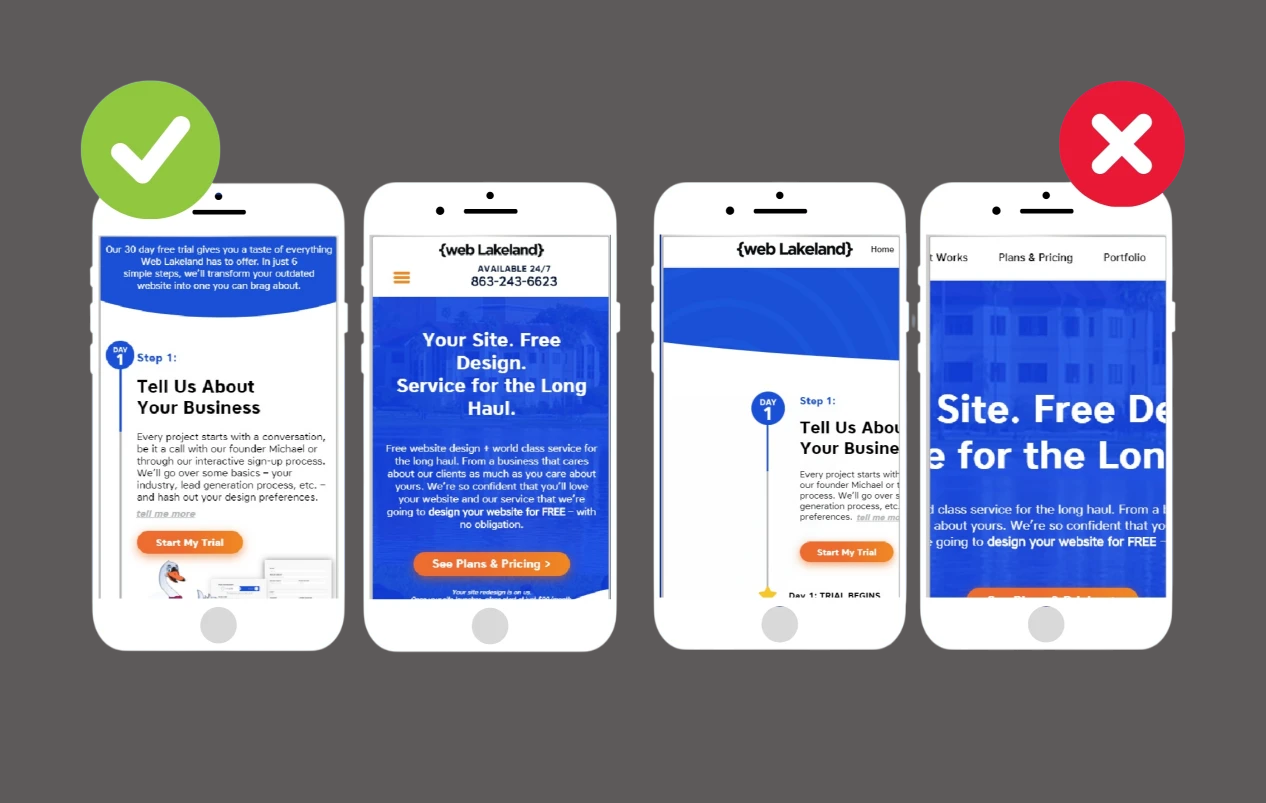
  • Mobile-Friendliness: More than half of all web traffic comes from mobile devices. If your site isn’t optimized for smartphones or tablets, you’re likely losing both users and rankings.
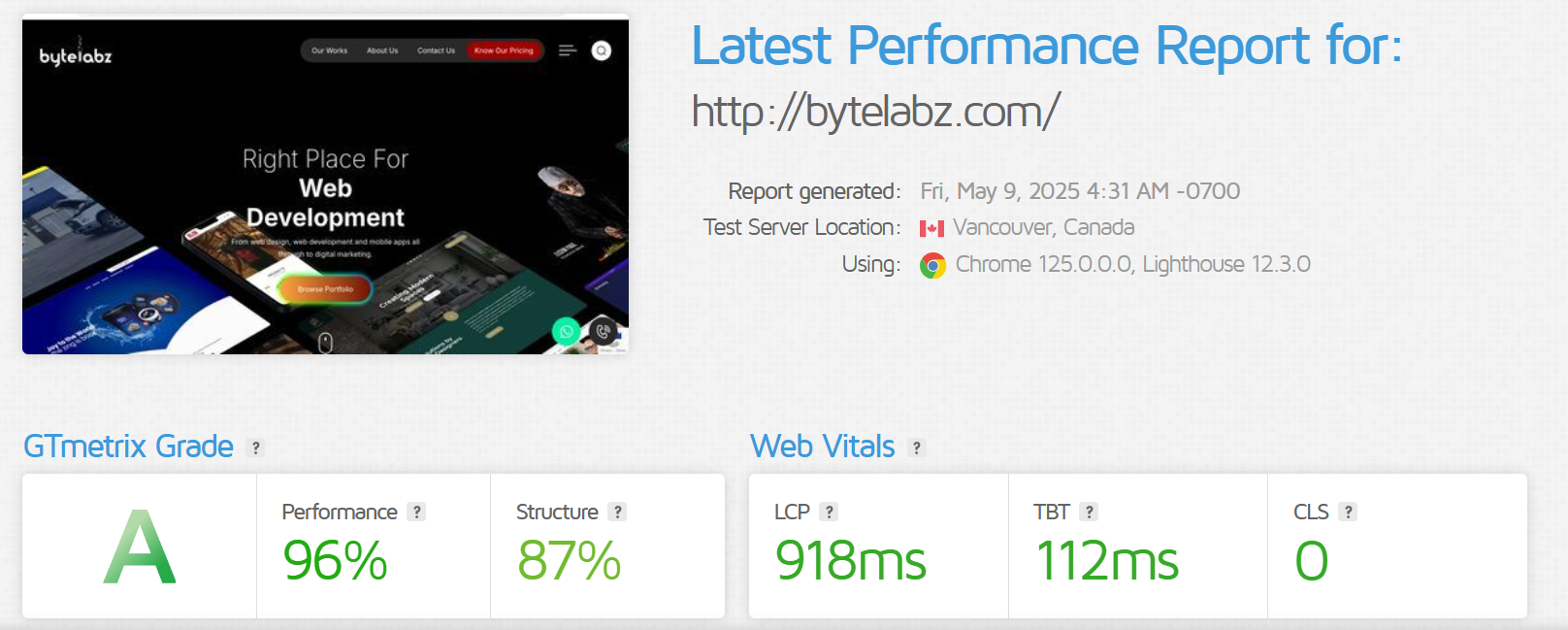
  • Page Speed: Users won’t wait more than a few seconds for a page to load. Slow websites increase bounce rates, which can negatively affect your SEO.
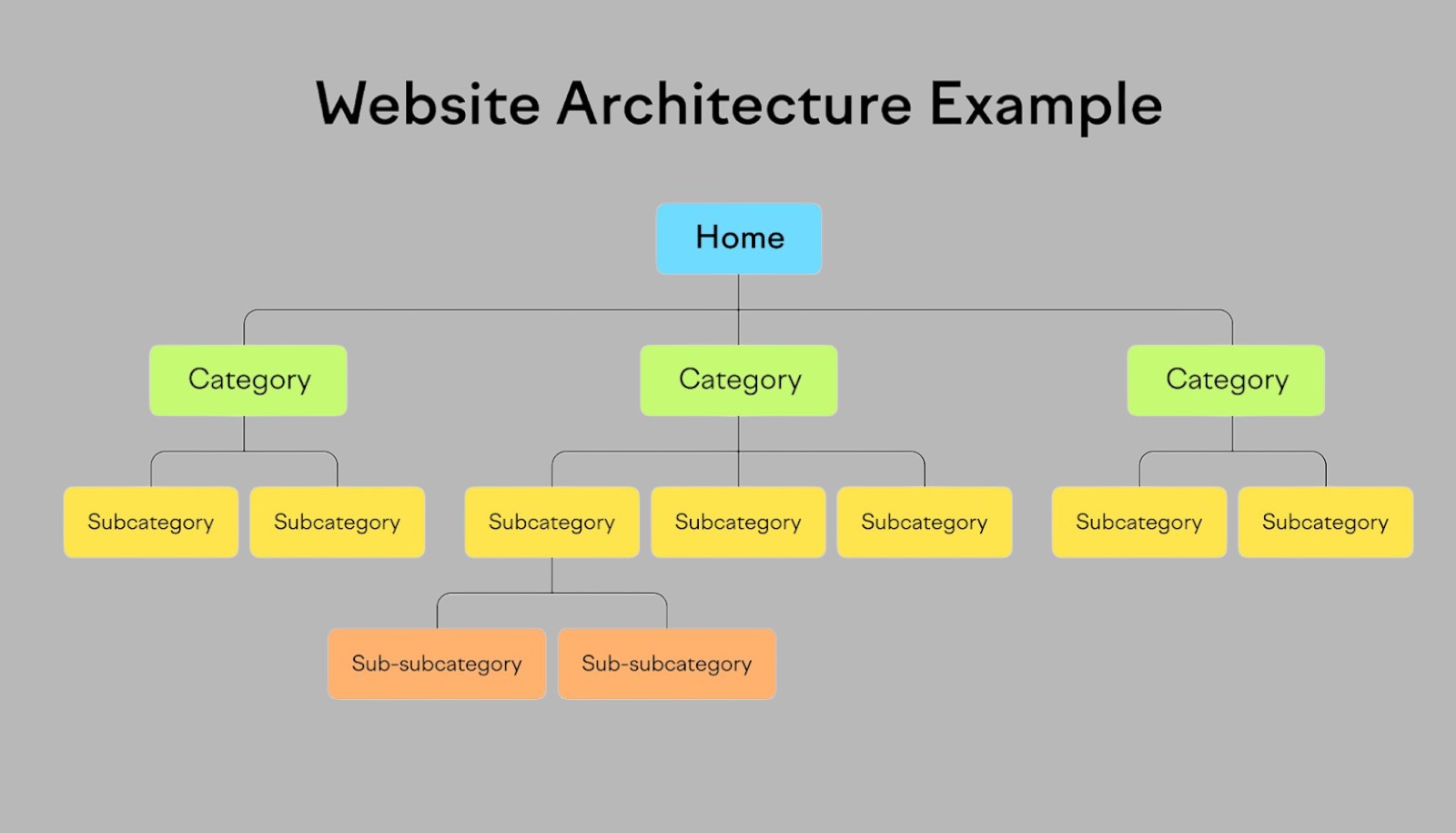
  • Clear Navigation: A well-structured website helps users find information quickly. This also helps search engines crawl your site more effectively.
  • Readable, Engaging Content: Easy-to-read, valuable content keeps users engaged. When people stay longer on your site, it signals to Google that your content is relevant and useful.
  • Safe and Secure (HTTPS): Security is part of user experience. Having a secure website not only builds trust but is also a ranking factor.

How to Optimize UX to Improve SEO Results


  1. 1. Speed Up Your Website

Slow websites lead to high bounce rates. Page speed is a key Google ranking factor.
How to fix it:

  1. 2. Make Your Website Mobile-Friendly

Mobile-first indexing means Google ranks your site based on the mobile version.
How to fix it:
  • Use responsive design
  • Avoid pop-ups and elements that cover content
  • Test using Google’s Mobile-Friendly Test
 
  1. 3. Improve Site Navigation

Clear navigation helps users and search engines discover content easily.
How to fix it:
  • Use a clear, intuitive menu
  • Add breadcrumbs
  • Keep the menu structure flat and organized
 
  1. 4. Use Clean, Readable Design

Good visual hierarchy improves engagement, which boosts time on site and reduces bounce rate.
How to fix it:
  • Use legible fonts and adequate spacing
  • Break content into sections with headings and bullets
  • Maintain consistent layout and colors
 
  1. 5. Create Engaging and Helpful Content

SEO is content-driven. Valuable, easy-to-consume content keeps users on your site.
How to fix it:
  • Write for users, not just keywords
  • Add images, videos, and infographics
  • Use proper H1, H2, and H3 tags for structure
 
  1. 6. Ensure Accessibility and Security

Accessible websites are more user-friendly and secure sites (HTTPS) get a ranking boost.
  How to fix it:
  • Use alt text for images
  • Make sure the site is keyboard-navigable
  • Install an SSL certificate
 
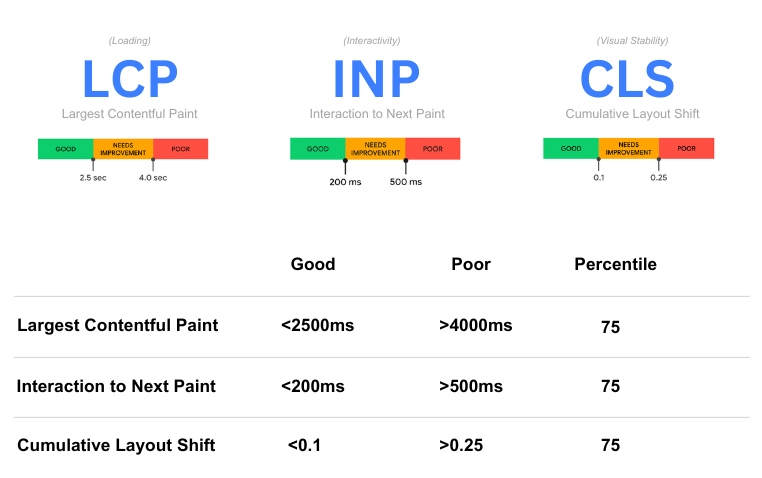
  1. 7. Improve Core Web Vitals

Google’s Core Web Vitals are official ranking factors.
  Metrics to optimize:
  • LCP (Largest Contentful Paint) – loading performance
  • FID (First Input Delay) – interactivity
  • CLS (Cumulative Layout Shift) – visual stability
 
  1. 8. Encourage User Interaction

Clicks, scrolls, and other interactions are positive UX signals to search engines.
  How to fix it:
  • Add internal links and CTAs
  • Use interactive elements like tabs, sliders, or FAQs
  • Enable commenting or review sections (where relevant)
 

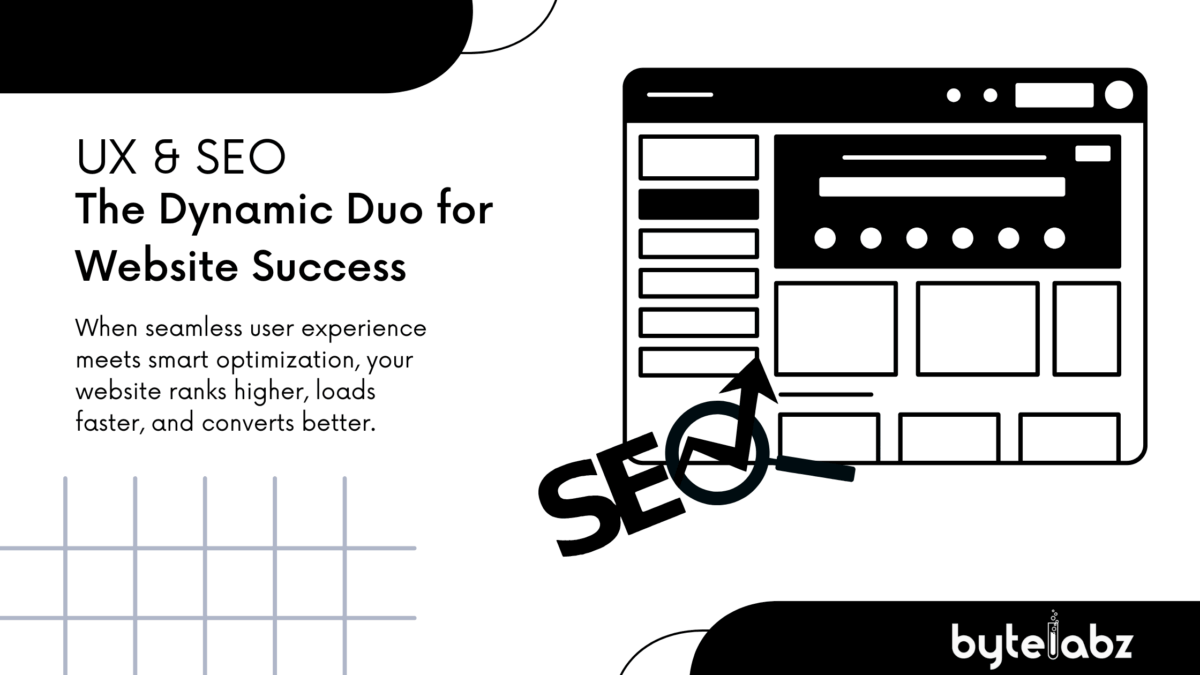
UX & SEO: The Dynamic Duo for Website Success

UX and SEO are not separate strategies—they’re interconnected. By focusing on a seamless user experience, you naturally improve SEO performance. And when your site ranks well, you attract more traffic, which creates a cycle of growth and success.
Categories
Blog

Smart Digital Marketing Moves for Small Businesses: A Complete Guide to Growth

In the fast-paced digital world, small businesses can no longer rely solely on word-of-mouth or physical presence to grow. A strong digital marketing strategy is essential to reach new customers, build brand awareness, and stay competitive. At Bytelabz, we understand that small business owners often juggle multiple roles. That’s why we’ve outlined five simple but powerful digital marketing strategies that can make a big impact—without needing a massive budget. Digital marketing tips for small business

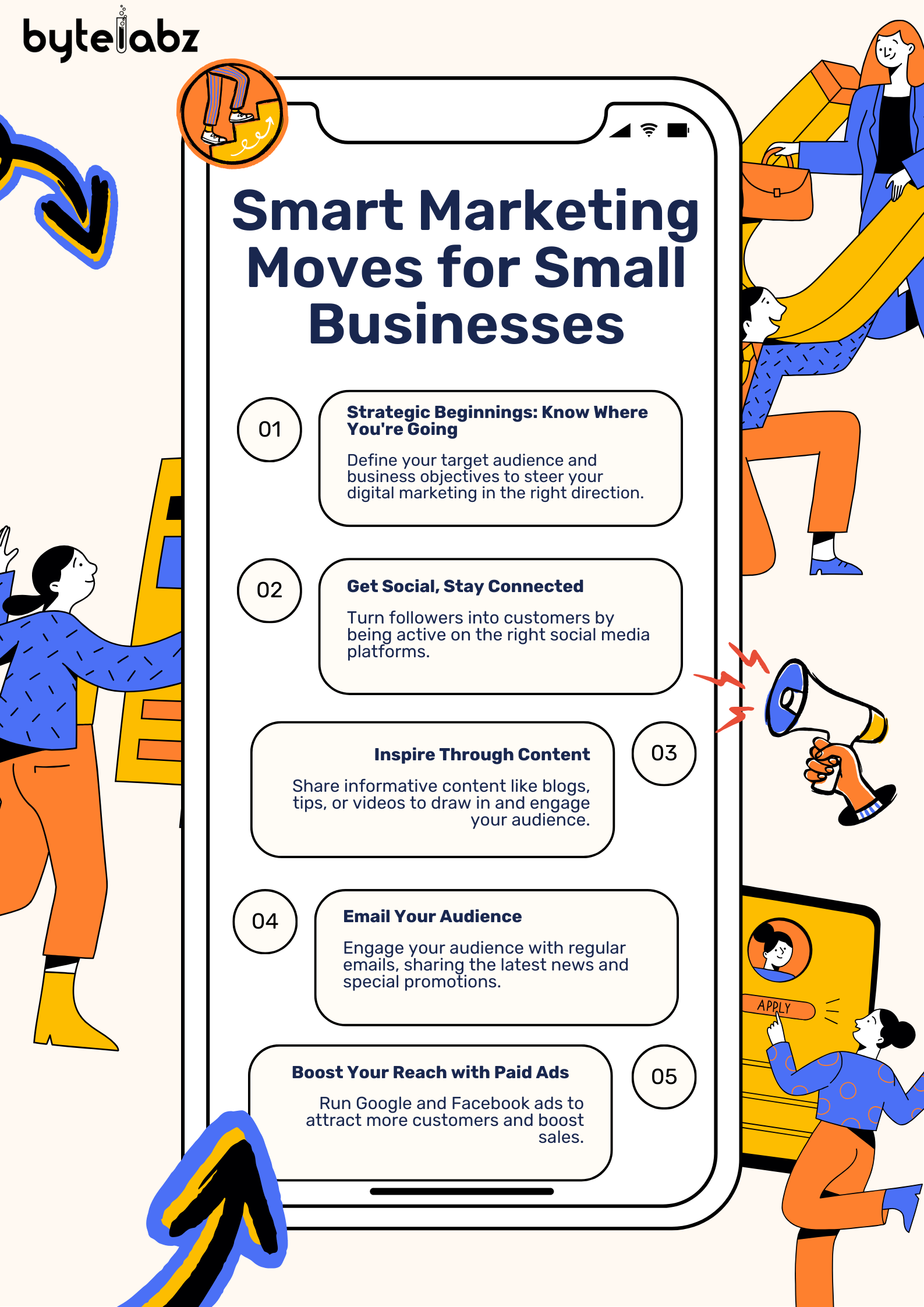
1. Strategic Beginnings: Know Where You’re Going

Before jumping into digital campaigns, it’s crucial to develop a clear digital marketing plan. A strong foundation begins with understanding:
  • Your Business Objectives: Are you looking to increase foot traffic, grow online sales, or generate leads?
  • Your Target Audience: Who are your ideal customers? What are their needs, pain points, and online habits?
  • Your Brand Message: What makes you unique? Why should someone choose your product or service?
💡 Why it matters: Without direction, your digital marketing efforts may be wasted. A well-defined digital marketing strategy ensures every effort contributes to your business goals. Action Tips:
  • Conduct simple customer surveys to understand preferences.
  • Create buyer personas for your top 2-3 customer types.
  • Set SMART goals (Specific, Measurable, Achievable, Relevant, Time-bound).
 

2. Get Social, Stay Connected

Social media marketing is one of the most affordable and effective ways to promote your business. Platforms like Facebook, Instagram, LinkedIn, and even WhatsApp Business allow direct communication with your audience. Benefits:
  • Boost brand visibility
  • Share product/service updates instantly
  • Build trust and loyalty through regular engagement
🗨️ Social proof, reviews, and user-generated content can greatly influence buying decisions. Action Tips:
  • Start with 2 platforms where your audience is active.
  • Use a content calendar to stay consistent.
  • Engage! Reply to comments, messages, and reviews.
 

3. Inspire Through Content

Content marketing is all about educating, informing, or entertaining your audience to keep them engaged with your brand. Whether it’s through blogs, short videos, infographics, or carousels, great content builds credibility. Why it Works:
  • Improves SEO (Search Engine Optimization)
  • Increases time spent on your site
  • Helps move leads through the sales funnel
📈 Businesses that blog regularly get 67% more leads than those that don’t. Action Tips:
  • Start a blog with helpful tips or industry insights.
  • Post short videos showing how your product works.
  • Create downloadable resources like checklists or eBooks.
 

4. Email Your Audience

Email marketing is a low-cost, high-ROI channel that lets you stay in touch with customers and leads. With regular newsletters, you can nurture relationships and increase repeat sales. Why You Need It:
  • Keeps your brand top-of-mind
  • Promotes time-sensitive offers
  • Drives traffic to your website or store
📬 The average ROI for email marketing is $42 for every $1 spent. Action Tips:
  • Collect emails through your website or in-store offers.
  • Send a weekly or biweekly newsletter with tips, updates, or exclusive deals.
  • Use tools like Mailchimp or Moosend for automation and tracking.
 

5. Boost Your Reach with Paid Ads

Organic marketing is powerful—but slow. Paid advertising like Google Ads and Facebook Ads allows you to get results fast by putting your brand directly in front of your target audience. Benefits of Paid Ads:
  • Highly targeted by location, interests, demographics, and behavior
  • Scalable—you can start small and grow based on performance
  • Great for time-bound promotions or new product launches
💰 Facebook Ads cost as little as ₹100/day and can still generate strong ROI. Action Tips:
  • Start with remarketing (targeting people who already visited your site).
  • Use strong visuals and a clear CTA (Call to Action).
  • Monitor and adjust your campaigns weekly.
 

Final Thoughts: Start Smart, Grow Smarter

Digital marketing isn’t just for large corporations with big budgets. With the right strategies and consistency, small businesses can thrive and scale. The key is to start small, stay consistent, and keep learning. Let Bytelabz help you build your digital foundation. Whether you need a website, social media strategy, or a complete digital marketing solution, we’ve got your back.
Categories
Blog

How AI is Revolutionizing Ecommerce: The Future of Online Business

In today’s digital-first world, ecommerce has become a powerhouse for businesses looking to grow and connect with a global audience. But as competition rises, it’s no longer enough to simply have a website and basic digital marketing strategies. Enter Artificial Intelligence (AI) — a technology that is fundamentally reshaping how ecommerce businesses operate, engage customers, and drive sales.


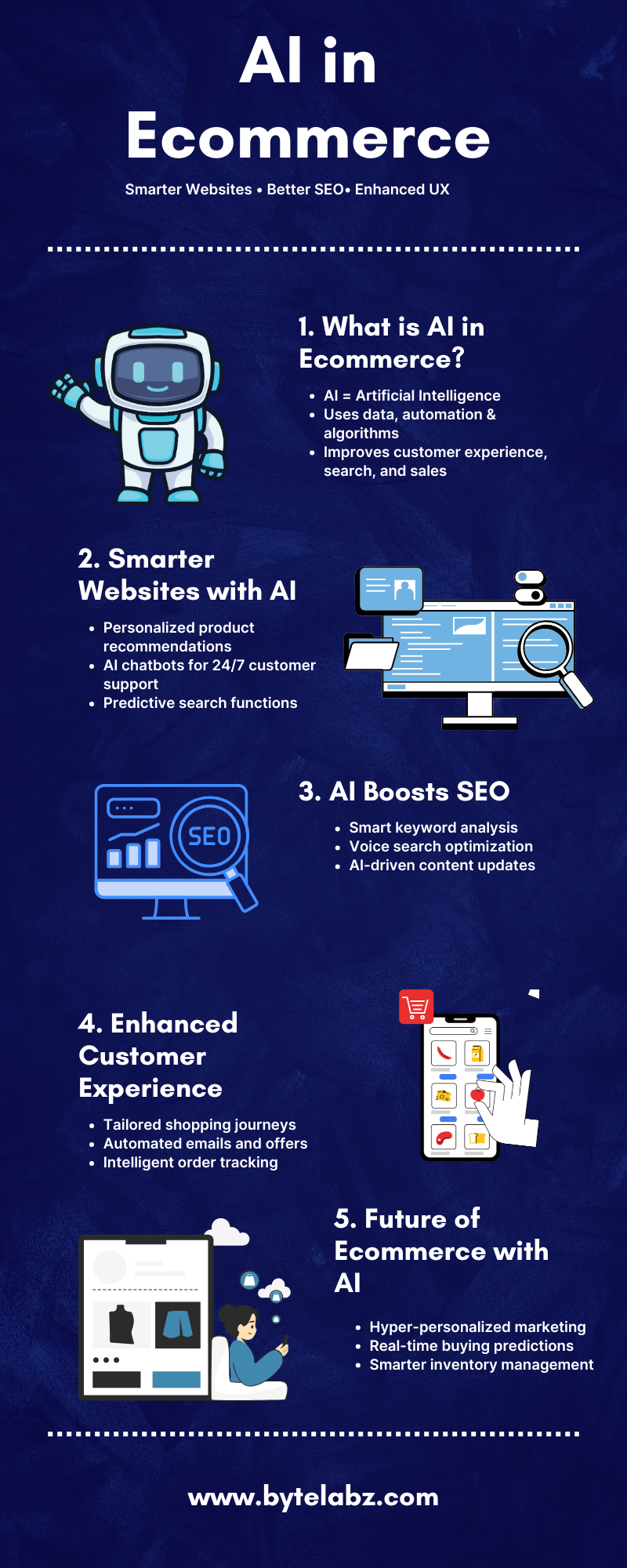
Smarter Customer Experiences Through AI

AI is taking ecommerce websites beyond static catalogs and basic search bars. With AI-powered personalization, brands can now deliver dynamic shopping experiences tailored to each visitor. By analyzing customer behavior, purchase history, and even browsing habits, AI can recommend products that users are most likely to buy — dramatically boosting conversion rates. For example, if a customer frequently shops for eco-friendly products, an AI-enhanced ecommerce website can highlight sustainable items, creating a personalized storefront experience. This level of customization not only improves user satisfaction but also strengthens brand loyalty.


AI and SEO: A Powerful Combination

Search engine optimization (SEO) has always been critical for ecommerce success. Today, AI marketing tools are transforming how businesses approach SEO. AI-driven SEO tools can analyze vast amounts of search data, detect keyword trends, and even suggest content optimizations faster than traditional methods. Moreover, AI can automate technical SEO tasks like fixing broken links, optimizing meta tags, and improving site speed—factors that are essential for higher search engine rankings. A well-optimized ecommerce website powered by AI ensures better visibility on Google, helping businesses reach more potential customers organically.


Inventory and Supply Chain Management

Behind every successful ecommerce platform is an efficient inventory and supply chain system. AI plays a crucial role here too. Predictive analytics, driven by AI, helps ecommerce businesses forecast demand, manage stock levels, and even predict future trends. This leads to reduced inventory costs, fewer stockouts, and faster delivery times — all factors that enhance the customer experience. By automating complex logistics tasks, businesses can focus more on strategic growth rather than day-to-day operations.

Ai And Ecommerce

Chatbots and AI Customer Support

One of the most visible applications of AI in ecommerce is the rise of chatbots. AI-powered chatbots are now a staple on modern websites, offering 24/7 customer support without human intervention. Whether answering product questions, resolving complaints, or guiding users through the checkout process, chatbots improve response time and customer satisfaction. Additionally, AI chatbots continuously learn from interactions, becoming smarter over time and providing even better service with minimal additional investment.


Visual Search and Voice Commerce

AI is also driving innovation through visual search and voice commerce. Shoppers can now upload images to find similar products on ecommerce websites, thanks to AI image recognition technology. Similarly, voice-enabled shopping, powered by smart assistants like Alexa and Google Assistant, is growing rapidly, offering users a hands-free and efficient way to shop online. For businesses, this means ensuring their websites are optimized not just for traditional text search but also for image and voice queries, creating new opportunities to capture market share.


The Future is AI-Driven

AI is no longer a “nice-to-have” for ecommerce businesses; it is becoming a critical element for survival and success. From enhancing SEO strategies to delivering hyper-personalized shopping experiences, AI is pushing the boundaries of what’s possible in ecommerce. If you’re running an ecommerce business and want to stay ahead, investing in AI technologies — from intelligent product recommendations to smart SEO tools — will be key. And it all starts with building a future-ready website that integrates these advanced capabilities seamlessly.   The world of ecommerce is evolving at an unprecedented pace, and AI is at the heart of this transformation. Businesses that embrace AI today will be better positioned to meet customer expectations, optimize operations, and achieve long-term success. Whether it’s through improving website performance, enhancing SEO, personalizing customer journeys, or streamlining logistics, AI is shaping the future of online shopping in ways we are just beginning to imagine.
Categories
Blog

The Importance of Choosing the Right Web Design and Development Company in Trivandrum

In today’s digital world, having a strong online presence is crucial for any business. A website acts as the face of your brand, creating the first impression for potential customers. For businesses in Trivandrum, partnering with a reliable web design and development company in Trivandrum can make a significant difference in how you reach and engage with your audience.

Why Is Web Design Important?


Your website is more than just a collection of pages. It’s a tool that helps you communicate your brand’s message, showcase your services, and convert visitors into customers. An attractive and user-friendly website ensures a seamless experience for users, increasing the likelihood of return visits and business growth. This is where a web design company in Trivandrum can help you build a website that stands out.

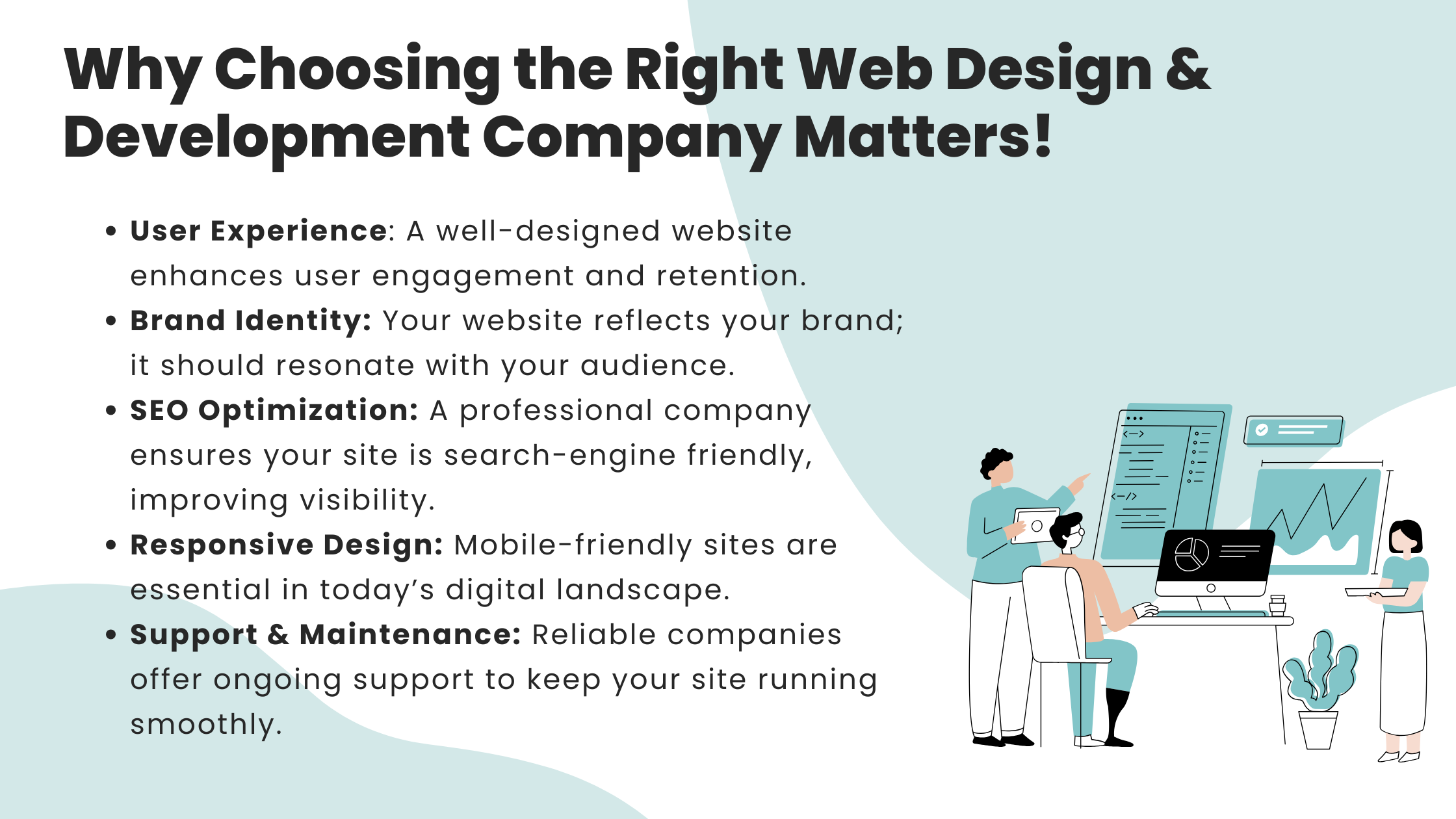
Why Choosing the Right Web Design & Development Company Matters

What to Look for in a Web Designing Company?


When searching for the best web design company in Trivandrum, there are several factors you need to consider. A good web design company will understand your business goals, target audience, and industry trends to create a website tailored to your needs. Here are a few qualities to look for:

  • Custom Design Solutions – Every business is unique, and so should be your website. Look for a company that offers customized web designs that reflect your brand’s personality and appeal to your audience. The top web design company in Trivandrum will always focus on creating designs that fit your specific needs.
  • User Experience (UX) Focused – A visually appealing website is great, but it’s essential that it provides a smooth user experience as well. Easy navigation, fast loading times, and mobile responsiveness are crucial features for any modern website. Partnering with a web development company in Trivandrum ensures your site is optimized for the best performance.
  • SEO-Friendly Design – A well-designed website is of little use if it’s not visible to search engines. The best web designing company in Trivandrum will ensure your website is built with SEO (Search Engine Optimization) in mind, helping you rank higher on Google and attract more traffic organically.

The Benefits of Hiring a Web Design Company in Trivandrum


Trivandrum has grown to be a hub for technology and innovation, and with that, the demand for professional web designing in Trivandrum has increased. Whether you’re a small business or a large enterprise, here are some benefits of hiring a local web design company in Trivandrum:

  • Local Expertise – A Trivandrum-based web design company understands the local market, your audience’s preferences, and what works best for businesses in the region. This knowledge can be vital for creating a website that resonates with local customers.
  • Personalized Service – Working with a local team allows for better communication, faster turnaround times, and more personalized service. You can meet with the team, discuss your vision, and get real-time updates.
  • Ongoing Support – The relationship doesn’t end once the website is live. The best web design company in Trivandrum offers ongoing support to ensure your website stays updated, secure, and performs well.

How to Choose the Best Web Design and Development Company in Trivandrum


Your website is one of the most important assets of your business, and choosing the right web design and development company in Trivandrum is crucial for its success. Look for a company that offers creative designs, focuses on user experience, and ensures SEO-friendly development. A well-designed website can make a lasting impact and help your business thrive in the competitive online space.

If you’re looking for the best web designing company in Trivandrum, make sure to choose one that aligns with your vision and helps you achieve your business goals.

Categories
Blog

Enhance Customer Engagement and Interaction with Google My Business

Why Your Business Needs Google My Business?

Having a Google Business Profile is like having a virtual shopfront that people see when they search for your business online. It helps you build trust and credibility with your customers. Optimizing your Google Business Profile helps customers find your business by sharing key details like address, contact info, and reviews.

In today’s digital world, having a strong online presence is essential for business growth. One effective way to achieve this is by creating a Google My Business profile. In this post, we’ll explain how to create your profile and how to keep it updated for the best results.

Exploring Google My Business

Google offers a free marketing tool called Google Business Profile, allowing business owners to manage their online presence on Google Maps and Search.

Setting up a Google Business Profile boosts your visibility by sharing photos and key details like your location, services, and products with Google.

Google Business Profile is accessible to a wide range of businesses, including those without a physical address, such as online retailers.

Creating Your Google My Business Page

Creating a Google My Business page is essential for any business looking to boost online visibility and attract new customers. This free tool from Google allows businesses to manage their appearance on Google Search and Maps. In this blog, we’ll walk you through creating your Google My Business page with easy-to-follow steps and clear headings to guide you along the way.

  1. Sign in to Google My Business

To start your Google My Business page, sign in to your Google account. If you don’t have one, create it at accounts.google.com. Then, go to google.com/business to access Google My Business.

  1. Enter Your Business Name

The next step in creating your Google My Business page is to enter your business name. Enter your full and accurate business name, as it will appear on your Google My Business page and in Google Search results.

  1. Enter Your Business Location

After entering your business name, you will be prompted to enter your business location. This includes your street address, city, state, and zip code. Verify again the accuracy of your company’s location since this will aid prospective clients in locating and visiting your establishment.

  1. Verify Your Business

After providing your business name and address, Google will ask you to verify your business. You can verify via mail or phone call. Just follow Google’s instructions to complete the process.

  1. Add Your Business Information

Once your business is verified, you can start adding more details to your Google My Business profile, like your business category, hours, phone number, website, and a short description. Make sure the information is accurate and thorough to help customers easily learn about your business.

  1. Add Photos and Videos

Using visuals to promote your brand and attract clients is a great idea. Add high-quality photos of your business exterior, interior, products, and services to give customers a glimpse of what you have to offer. Videos can also be added to provide more engaging content for customers.

  1. Monitor and Manage Your Google My Business Page

After setting up your Google My Business page, remember to check and update it regularly. Respond to reviews, keep your info current, and share updates to stay connected with customers. Managing your page actively boosts your online visibility and draws more customers to your business.

Creating a Google My Business page is essential for online presence and customer attraction. Follow steps to make a professional page with detailed info, media, and active management for maximum impact.

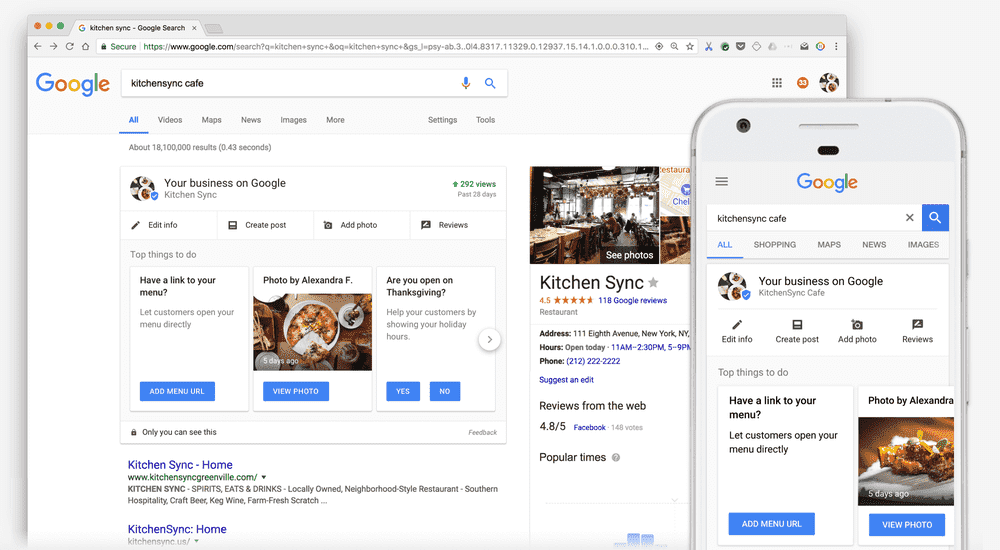
This is how GBP looks like:

Google My Business

Benefits of Google Business Profile

Now that you have successfully created your Google My Business account, let’s explore the benefits it can bring to your business. Having a Google My Business account can boost your local SEO ranking, making it simpler for potential customers to discover your business in Google searches. With this account, you can display essential details like your address, phone number, business hours, and customer reviews, providing customers with the information they need to decide whether to visit your business.

Google My Business offers insights on customer engagement like views, clicks, and requests. Utilize this information to draw clients and enhance your web presence. To encourage consumer interaction, post updates, reply to reviews, and keep your profile up to date.

The most important benefits of having a Google Business Profile include:

  1. Increased Online Visibility: Your business will be more visible in Google Search and Maps, making it easier for potential customers to find you.
  2. Customer Engagement: You can interact with customers by responding to reviews, posting updates, and sharing information about your products or services.
  3. Credibility and confidence: Customers may develop confidence in a well-maintained Google Business Profile by providing accurate information, good ratings, and favorable reviews.
  4. Local SEO: Having a Google Business Profile can improve your local search engine optimization (SEO) and help your business rank higher in local search results.
  5. Analytics and Insights: You can track how customers find and interact with your business online through Google My Business insights.
  6. Free Marketing Tool: Google My Business is a free tool that allows you to promote your business, share updates, and connect with customers without any additional cost.
  7. Increase Website Traffic: By providing a link to your website on your Google Business Profile, you can drive more traffic to your site.

Overall, having a Google Business Profile offers numerous benefits that can help your business reach a wider audience, engage with customers, and improve its online presence.

Optimizing Your Google Business Profile

However, creating a Google My Business account is just the first step. To ensure maximum visibility and relevance on Google’s search results, it is important to regularly update and optimize your business listing. At any time, you may change the information on your Google Business Profile.

Here are some tips to keep your Google My Business account updated:

  1. Keep info current: Ensure your business details like name, address, phone number, website, and hours are accurate.
  2. Share photos and posts: Add quality photos and posts to showcase your business and any promotions or events.
  3. Respond to reviews: Engage with customers by replying to reviews, showing you value their feedback.
  4. Use GMB features: Make use of features like messaging, booking appointments, and product listings to enhance customer interaction and decision-making.
Boost Your Reputation with Google Reviews

Google Reviews on Google My Business are crucial for several reasons:

Here are the benefits of positive Google Reviews:

  1. Build Trust: Good reviews establish credibility and trust with potential customers.
  2. Boost Visibility: Positive reviews increase visibility in local searches, attracting more customers.
  3. Improve SEO: Good reviews enhance SEO, helping your business rank higher in search results.
  4. Engage Customers: Responding to reviews shows you value feedback and engage with your audience.
  5. Feedback for Improvement: Reviews offer insights to enhance your business based on customer feedback, improving products and services.

Google Reviews on your Google My Business profile are essential for building trust, improving SEO, and engaging with customers. They also provide valuable feedback to help improve your business. By making the most of reviews, you can greatly enhance your online reputation and success in the digital world.

Creating a Google My Business profile is a simple and effective way to increase visibility for your business and attract more customers. Keep your profile updated and engage with customers to maximize your Google My Business benefits and help your business thrive online. Create your Google My Business profile today with Bytelabz and start reaping the rewards of a strong online presence.

Categories
Blog

The Ultimate Guide to Responsive Image Optimization

Leveraging HTML Picture Element for Responsive Images

In the ever-evolving landscape of web development, creating responsive websites that cater to a variety of devices and screen sizes is crucial. One key aspect of responsiveness is optimizing images for different devices to ensure fast loading times and a visually appealing experience. In this blog post, we will delve into how you can use the HTML ‘<picture>’ element along with ‘<source>’ elements to define different image sources based on the device’s characteristics.

What makes an image responsive?

Responsive images are images on a website that are designed to adapt and display appropriately on different devices and screen sizes. With the increasing variety of devices such as smartphones, tablets, laptops, and desktop computers, it is important to ensure that images are optimized for each device to provide the best user experience.

Responsive images can be implemented using techniques such as using CSS to set the image size based on the screen width, using the HTML `<picture>` element with ‘<source>’ elements to provide different image sources for different screen sizes, or using media queries to load different images based on the device’s characteristics.

By using responsive images, web developers can ensure that images are displayed correctly and efficiently across various devices, improving the overall usability and performance of the website. This helps in creating a seamless and visually appealing experience for users, regardless of the device they are using to access the website.

Responsive images are important for several reasons:

  1. Improved User Experience: Responsive images ensure that images on a website or web application look good and are properly displayed on devices with different screen sizes and resolutions. This helps provide a better user experience for visitors, regardless of the device they are using.

  2. Faster Loading Times: By serving appropriately sized images based on the device’s screen size and resolution, responsive images can help reduce loading times and improve website performance. This is crucial for optimizing the user experience and SEO rankings.

  3. Bandwidth Efficiency: Serving images that are optimized for the device’s screen size and resolution helps reduce the amount of data transferred between the server and the user’s device. This can be especially important for users on limited data plans or slower internet connections.

  4. SEO Benefits: Search engines like Google consider page load speed and mobile-friendliness as ranking factors. By using responsive images, you can improve your website’s performance on mobile devices, which can positively impact your search engine rankings.

  5. Future-Proofing: Responsive pictures are crucial to maintaining the accessibility and visual appeal of your website across a range of platforms, given the wide range of devices and screen sizes that are now in use. It is possible to future-proof your website and make it compatible with emerging technology by using responsive design concepts.

Overall, responsive images play a crucial role in creating a user-friendly, fast-loading, and visually appealing website that performs well on a variety of devices.

Understanding the ‘<picture>’ Element

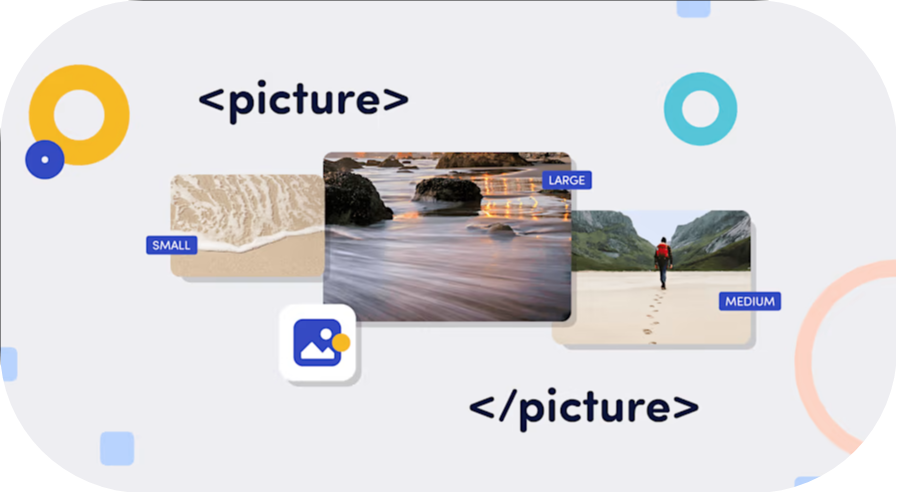
The ‘<picture>’ element is a versatile tool that allows web developers to provide multiple sources for an image based on different criteria such as screen size, resolution, or even color depth. This element offers a more robust solution compared to the traditional ‘<img>’ tag when it comes to delivering optimized images across various devices.

To use the HTML ‘<picture>’ element to define different source images based on device conditions, you can follow these steps:

  1. Structure your HTML: Start by structuring your HTML code with the ‘<picture>’ element and the ‘<source>’ elements inside it. You can also include an ‘<img>’ element as a fallback for browsers that do not support the ‘<picture>’ element.

  2. Define Media Queries: Use the ‘media’ attribute within the `<source>` elements to define media queries that target specific device conditions, such as screen width, resolution, or device orientation.

  3. Specify Image Sources: Within the ‘<source>‘ elements, use the ‘srcset‘ attribute to specify the path to the image source that should be used when the corresponding media query condition is met.

  4. Fallback Image: Include an ‘<img>‘ element with the ‘src‘ attribute pointing to a default image source. This image will be displayed if none of the media queries match or if the browser does not support the ‘<picture>‘ element.

Here’s an example code snippet demonstrating how to use the ‘<picture>’ element to define different source images based on device conditions:
Leveraging html picture
In this example: – The first ‘<source>’ element specifies the image source for devices with a screen width of 600px or less. – The second ‘<source>’ element specifies the image source for devices with a screen width greater than 600px. – The ‘<img>’ element serves as a fallback image in case none of the specified conditions match. By following these steps and implementing the ‘<picture>’ element with ‘<source>’ elements in your HTML code, you can create responsive images that adapt to different device conditions for an enhanced user experience.

Best Practices and Considerations

When implementing responsive images using the ‘<picture>’ element, consider the following best practices: – Optimize your images for different resolutions to improve loading times and user experience. – Test your responsive images across various devices and screen sizes to ensure consistent rendering. – Use descriptive ‘alt’ attributes for images to enhance accessibility and SEO. By leveraging the HTML ‘<picture>’ element and ‘<source>’ elements, you can create a more adaptive and user-friendly web experience that caters to the diverse landscape of devices and screen sizes prevalent today.

In conclusion, the HTML ‘<picture>’ element provides a powerful mechanism for delivering optimized images based on device characteristics, enhancing the overall responsiveness and performance of your website. Experiment with this feature in your projects to create visually stunning and fast-loading websites that engage users across different platforms.

Remember to replace “small.jpg”, “large.jpg”, and “fallback.jpg” with the actual paths to your image sources to effectively implement responsive images using the ‘<picture>’ element.

With these new strategies, we hope you have a better understanding of responsive images. Learn everything you need to know about responsive images, including best practices and tips for optimizing your website’s performance. Elevate your website’s visual appeal and user experience by harnessing the power of the HTML Picture Element with Bytelabz’s expert guidance on responsive image optimization.